
How to Learn AI From Scratch in 2026: The 20% Rule for Lifelong Mastery
Introduction
The Artificial Intelligence landscape moves at a staggering velocity. If you try to learn AI today by reading every textbook, watching every tutorial, or keeping up with every minor tool release, you will succumb to overwhelming burnout.
Much of what is published online is either outdated theory or hype-driven fluff. To achieve true literacy and efficiency, you must ignore the useless 80% of information and focus strictly on the 20% of practical AI concepts that yield 80% of the real-world results. This approach guarantees that the skills you build today will remain relevant a decade from now.
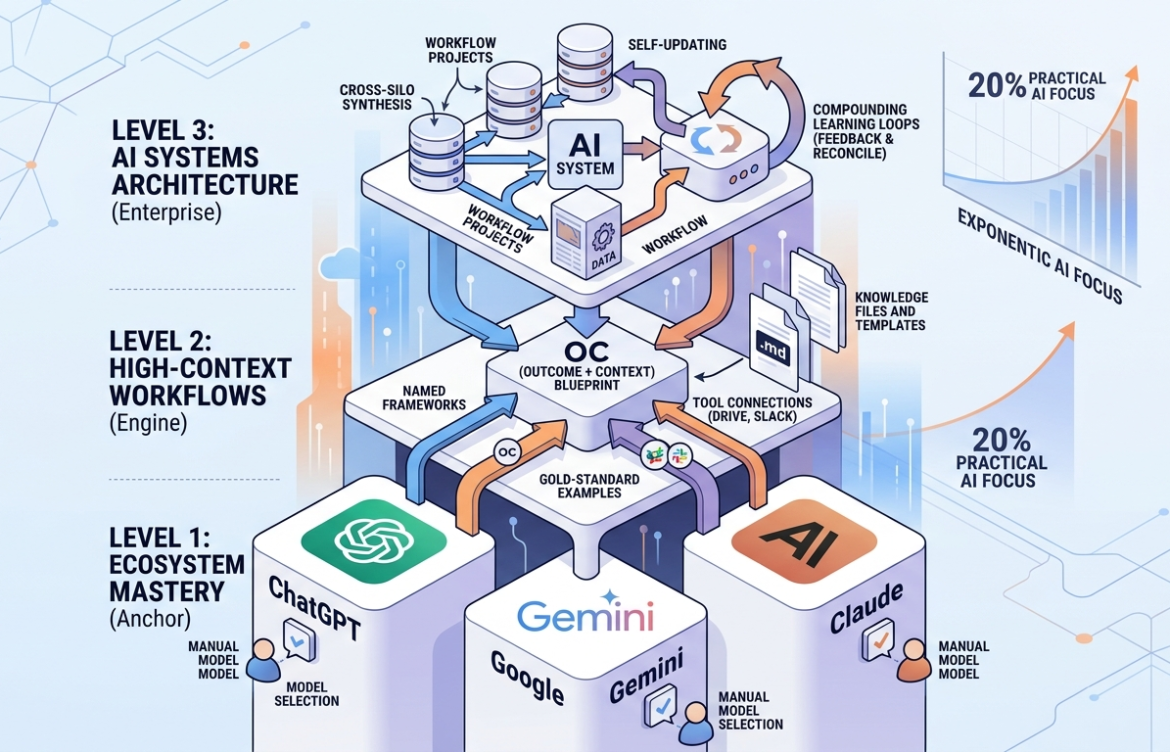
This blueprint breaks down AI mastery into three progressive layers: mastering a single frontier ecosystem, shifting from prompt frameworks to high-fidelity context injection, and aggregating isolated workflows into an interconnected, self-improving AI system.
What You’ll Learn
- The “Starter Pokemon” Strategy: How to select and master a single frontier model tailored directly to your specific professional workload.
- The Fallacy of Prompt Engineering: Why elaborate prompting frameworks have become obsolete and why context injection rules supreme.
- The Outcome + Context (OC) Blueprint: A foolproof framework to achieve superior AI outputs without spending 10 minutes writing a prompt.
- The Power of Permanent Silos: How to build “Projects” and “Gems” to completely automate recurring workstreams.
- Advanced Cross-Silo Architectures: How to build an integrated AI system that synthesizes disparate data sources and auto-updates based on user feedback.
Level 1: Core Tool Mastery (The Foundation)
The Convergence of Frontier Models
A common point of paralysis for beginners is choosing a foundational platform. However, competitive data shows a fascinating trend: Model Convergence.
While different AI companies used to be miles apart in capabilities, the top tier models are now heavily clustered together in overall capability. Because these tech giants continuously mirror each other’s feature sets, the practical variance for an average knowledge worker is negligible. Once you build deep operational fluency in one ecosystem, those cognitive skills transfer directly to competing platforms.
Selecting Your Core Ecosystem
To cut through the noise, eliminate non-competitive tools. For example, XAI’s Grok lacks broader workforce utility, Perplexity acts primarily as an information-retrieval overlay rather than a frontier creator, and open-source alternatives often require specialized technical configurations.
Focus exclusively on the “Big Three” Western ecosystems: ChatGPT, Claude, and Google Gemini.
| Ecosystem | Primary Workload Strengths | Key Distinctive Feature |
| ChatGPT (OpenAI) | Deep market research, real-time web verification, extensive documentation lookup. | Most mature ecosystem with the largest repository of community tutorials. |
| Claude (Anthropic) | Elite long-form composition, graphic/interface design evaluation, code generation, and complex data parsing. | Exceptional analytical nuance and structural execution. |
| Google Gemini | Deep integration with corporate workspaces, cross-referencing multi-hour videos, audio files, and spreadsheets simultaneously. | Native multimodal processing across text, audio, images, and video. |
The Three Operational Rules of Level 1
- Prioritize Paid Tiers: If you are forced to choose between using ChatGPT Free or a paid workspace version of Google Gemini provided by your employer, choose the paid version. The technical gulf between a free tier and a paid frontier model is night and day. Premium tiers provide access to advanced reasoning engines that catch structural nuances free models completely ignore.
- Match the System to Your Daily Workflow: Pick the platform whose native strengths match your primary medium (e.g., choose Claude if your job involves writing or coding; choose Gemini if you live inside Google Workspace documents and spreadsheets).
- Override the Defaults: AI providers naturally default your interface to their lightweight, cost-efficient models because they are cheaper to run. When processing deep intellectual work, manually select the most powerful model available in your drop-down menu to force the engine to step-by-step map out its logic.
Level 2: High-Context Workflows (The Engine)
The Myth of the Perfect Prompt
As foundational models scale in intelligence, the importance of complex prompting frameworks diminishes. Modern reasoning models do not need you to spend fifteen minutes explicitly defining a detailed psychological role, tone setting, and format guide. They are smart enough to infer those variables automatically—provided you supply the correct context.
Consider this scenario: You need to find a dinner venue for your executive.
- Approach A: You spend 10 minutes writing a highly detailed prompt describing your manager’s personality traits, historic food distastes, and atmospheric desires.
- Approach B: You paste a simple bulleted list of five restaurants your manager has thoroughly enjoyed in the past and tell the AI to find a matching spot.
Approach B wins every single time. High-fidelity context beats an intricate prompt framework because data contains hidden patterns and stylistic expectations that human beings routinely forget to explicitly articulate.
The OC Framework: Outcome + Context
Instead of memorizing bloated prompting frameworks, distill your interactions into a single formula:
$$\text{Output} = \text{Outcome} + \text{Context}$$
Case Study: Formulating a Specialized Training Regimen
- Poor Prompting (Over-indexing on instructions): “Act as a senior Tier-1 personal trainer with 20 years of experience. Write a highly optimized 4-day workout plan using a push-pull-legs methodology for a busy executive…”
- Optimal Prompting (The OC Framework): You copy a highly vetted, authoritative athletic article breaking down a scientific push-pull-legs routine. You drop it into the context window and append:Outcome: “My goal is to develop a 4-day training routine for muscle growth, restricted to 45 minutes a day at home.”Context: [Pasted Article]
Because the underlying engine reads the authoritative article as its immediate context, it bypasses generic fitness tropes. It instantly infers a highly specific role (e.g., a specialist in high-density compound training) and designs a localized routine that matches the precision of the source text.
Three Ways to Extract and Inject Elite Context
To systematically fuel your OC prompts, use these three collection methods:
- Leverage Named Industry Frameworks: Do not spend paragraphs defining how a corporate memo should be structured. Instruct the model to rewrite your raw notes using the “Pyramid Principle” or to critique an upcoming strategy utilizing “Porter’s Five Forces”. A few precise words inject massive contextual guardrails. If you aren’t sure which framework applies, ask the AI beforehand: “What are the most widely respected frameworks for evaluating product-market fit?”
- Provide Concrete Gold-Standard Examples: When requesting recurring assets (like a weekly status report), paste two or three historic updates that were officially approved by leadership. Follow it with your raw scribble of text and state: “Write this week’s update in the exact same format and tone.” The AI will reverse-engineer your team’s cultural preferences seamlessly.
- Enable Direct Tool Connections: Instead of manually exporting transcripts, downloading PDFs, and uploading files, utilize the native extensions within your ecosystem. Connect your AI platform directly to your corporate storage (Google Drive, Microsoft OneDrive) or communication tools (Slack, email accounts) to allow the engine to crawl the necessary source files on demand.
Creating Permanent Memory Silos via Projects
Manually copying and pasting your core context files into a chat box every morning is highly inefficient. To bypass this, leverage permanent workflow environments. In ChatGPT and Claude, these are called Projects; in Google Gemini, they are known as Gems.
A permanent project environment is comprised of three core attributes:
- Project Instructions: The static global rules, behavioral constraints, and long-term goals that govern every conversation inside that silo.
- Knowledge Files: Your reference documentation, gold-standard templates, and operational frameworks that remain permanently uploaded.
- Dynamic Memory: A background ledger that the AI auto-updates over time, tracking milestones, iterations, and updated preferences within that specific workstream.
💡 Pro Tip (File Formatting): Always convert your reference PDFs, documentation sheets, and templates into Markdown (.md) files before uploading them into your AI Projects. Markdown files strip away messy structural code, making them significantly easier for an LLM to read accurately, while heavily reducing your operational token usage. You can easily paste your content into the AI first and ask it to convert the data into a clean Markdown format.
Level 3: AI Systems Architecture (The Enterprise Ecosystem)
The Limitation of Projects: Isolated Silos
While Level 2 environments are exceptional for individual recurring workstreams, they suffer from a major design flaw: Siloing. Your workout-tracking project cannot access your medical history project; your personal finance tracker has zero visibility into your upcoming corporate travel itinerary project. Even though these areas of your life heavily interact, their data pools remain completely blind to one another.
To achieve ultimate efficiency, you must scale your setup from independent projects into a unified AI System.
[Isolate Silos (Level 2)]
Project A (Health)   --> No Communication <--   Project B (Fitness)

[Integrated AI System (Level 3)]
Project A (Health)   ----\                       /---> Cross-Silo Insights
Project B (Fitness)  ------> [ AI SYSTEM ] -----> ---> Compounding Learning Loop
Project C (Finance)  ----/                       \---> Holistic Automations
An AI System bridges these gaps by executing two distinct tasks:
- Cross-Silo Synthesis: It automatically pulls context from disparate data sources, matches cross-functional patterns, and surfaces high-value insights that isolated chats would completely miss.
- Compounding Learning Loops: The architecture self-optimizes by structurally evaluating your post-generation human edits, converting your real-world feedback into permanent systemic rules.
Three Tiers of AI System Architectures
Depending on your technical literacy, you can build your systemic foundation across three distinct implementation tiers:
| Tier | System Example | Tech Literacy Required | Pros & Cons |
| Tier 1: Ecosystem Native | Google Gemini Spark | Absolute Beginner | Pros: Zero configuration needed; automatically bridges native apps like Gmail, Sheets, Docs, and Calendar. Cons: Limited custom logic and lack of fine-tuned model control. |
| Tier 2: No-Code Orchestrator | Claude Co-work | Intermediate | Pros: Gives creators structural control over custom workspace logic without typing code; offers highly targeted cross-project context linking. Cons: Requires manual baseline workspace configuration. |
| Tier 3: Programmatic Agents | Anthropic Claude Code / OpenAI Codeex | Advanced Developer | Pros: Completely unrestricted, infinitely customizable, and highly automated programmatic capabilities. Cons: Requires continuous code-level maintenance and terminal operation comfort. |
Real-World System Implementations
To visualize how an integrated AI system operates, consider these two real-world workflows:
1. Holistic Health Optimization (Cross-Silo Synthesis)
Imagine you maintain three separate datasets: your annual lab blood work, your daily supplement list, and your current physical workout split.
- The Siloed Result: In isolated projects, each file looks completely normal.
- The Systemic Result: When processed through a unified system like Claude Co-work, the AI reviews your latest lab work, notices a borderline high cholesterol marker, references your workout split to find a lack of cardiovascular conditioning, and looks at your supplement log. The system flags the precise gap, updates your routine to insert Zone-2 cardio sessions on your rest days, and explicitly confirms that your current fish oil intake is already optimized for this condition. The system connects data dots that you would have had to manually copy, paste, and prompt to discover.
2. The “Reconcile Move” (Compounding Learning Loop)
This is an elite workflow for copywriters, executives, and content creators. When you need the system to draft an asset (e.g., a script segment or a business proposal), let the system generate its initial draft. Take that draft, paste it into your word processor, and make your manual human edits to inject your distinct tone, vocabulary, and style.
Instead of moving on, feed your finalized human version back into the system alongside the initial machine draft and execute this command:
“Reconcile my final version with your initial output. Analyze every structural, stylistic, and tonal change I made, and propose permanent behavioral rules to remember for our future drafts.”
[Image demonstrating the Reconcile process: Initial Draft + Human Edits -> AI Analysis -> Permanent Rules]
The system will dissect your precise stylistic preferences, map your writing patterns, and update its global instructions. Through this compounding feedback loop, the system requires fewer guidelines over time because it continuously adapts to your unique voice.
Step-by-Step Implementation Guide
If you are starting from absolute scratch, follow this exact linear deployment strategy:
Phase 1: Set Up Your Foundational Anchor (Week 1)
- Commit to one primary frontier ecosystem (ChatGPT Plus or Claude Pro).
- Go into your profile settings and verify that you are defaulting to the highest-performing reasoning model (e.g., Claude 3.5 Sonnet or ChatGPT-4o).
- Download the system’s desktop and mobile applications to lower the barrier to daily entry.
Phase 2: Deploy Your First Permanent Project (Week 2)
- Identify a core, high-frequency task in your current workflow (e.g., generating client email responses or summarizing weekly team syncs).
- Gather 3 historical examples where you executed this task perfectly. Paste them into an AI prompt and type: “Convert these examples into a clean Markdown (.md) document highlighting the core tone, structure, and formatting constraints.” Save that text as a file.
- Open the “Projects” or “Gems” interface, name your workspace, upload that Markdown file into your Knowledge Base, and define your core target goal in the Project Instructions.
Phase 3: Transition to Systemic Automation (Week 3 and Beyond)
- Link your core file storage channels (Google Drive or OneDrive) to your primary AI environment.
- Build your second and third independent projects (e.g., moving from a work-task project to an industry-research project).
- Execute the Reconcile Move at the conclusion of every major project deliverable to systematically train the workspace to replicate your mind.
Key Takeaways
- Deep Over Wide: Do not spread your attention thin across hundreds of micro-AI tools. Master one primary ecosystem; the operational competencies will effortlessly translate to all other platforms.
- Context Dictates Quality: Ditch complex prompting blueprints. Provide a crystal-clear Outcome and drop in real-world, high-fidelity Context via framework naming and gold-standard examples.
- Stop Repeating Yourself: Use Projects and Gems to store reference files, guidelines, and frameworks permanently.
- Build Systems, Not Silos: Transition toward integrated workspace environments that can cross-reference multiple data streams and auto-optimize through iterative human feedback loops.
Frequently Asked Questions (FAQ)
1. Is prompt engineering still a necessary skill to learn?
No, complex prompt engineering frameworks are largely obsolete. Because modern frontier models possess advanced baseline reasoning capabilities, they no longer require rigid structural prompting formulas to behave correctly. Your focus should shift entirely toward providing accurate, clean data context and clear outcomes.
2. How do I choose between ChatGPT and Claude?
Choose ChatGPT if your daily work relies heavily on real-time internet research, complex web lookups, and massive data collection. Choose Claude if your primary outputs require elite literary composition, complex analysis, creative styling, or web interface and code design.
3. What exactly is a Markdown (.md) file, and why does AI prefer it?
A Markdown file is a plain text file that uses simple text formatting symbols (like # for headers and * for bullet points). Standard documents like PDFs and Word files contain hidden layout code that clutters an LLM’s context window. Markdown strips away this digital noise, allowing the AI to process your files faster, more accurately, and at a lower token cost.
4. What is the difference between an AI Project and a standard AI chat window?
A standard chat window forgets everything the moment you close it or start a new thread, forcing you to re-upload your templates and instructions constantly. An AI Project serves as a permanent workspace that securely holds your background rules, core files, and continuous memory across all future chats inside that workflow.
5. Will my data be used to train public AI models if I upload it into Projects?
If you use the paid enterprise, team, or premium workspace tiers of providers like OpenAI, Anthropic, or Google, they explicitly state in their privacy terms that your data is segregated and not used to train public models. Always review your specific account settings to ensure data sharing for model training is turned off.
6. Can I move my custom settings from Claude to Gemini or ChatGPT easily?
Yes. Major ecosystems offer memory import options within their account settings. Because these systems use highly similar linguistic logic, you can easily ask one AI to package your project settings into an instructional prompt to paste directly into a competing platform.
7. What is an “AI System” in practical terms?
An AI System is a workspace architecture (like Claude Co-work or Google Gemini Spark) that connects individual, isolated projects together. It allows the underlying AI models to view all your information assets simultaneously to find overlapping patterns and execute cross-functional logic.
8. What is the “Reconcile Move”?
The Reconcile Move is an optimization technique where you feed an AI’s initial draft along with your manually edited final version back into the system. You instruct the AI to analyze the differences to identify your personal stylistic rules, ensuring the next piece of content it writes matches your voice much closer.
9. Why shouldn’t I use free AI models for my professional work?
Free models use older, highly compressed reasoning engines to save the provider server costs. They frequently miss subtle logical constraints, produce generic copy, and lack advanced long-term project memory capacities. Premium models offer vastly superior problem-solving depth.
10. Do I need to know how to code to build an AI System?
No. While advanced programmatic systems require terminal coding skills, highly powerful platforms like Claude Co-work and Google Gemini Spark are explicitly engineered for non-technical users, relying entirely on plain language instructions and simple visual settings.
Conclusion
Learning AI from scratch does not require technical coding expertise or an understanding of complex neural-network mathematics. True literacy lies in understanding how to steer these machines effectively.
By anchoring yourself to a premier frontier model, shifting your execution framework from prompts to context injection, and building interconnected learning systems, you position yourself far ahead of the average user. Stop focusing on the overwhelming noise of the daily AI hype cycle. Master the core 20% of systemic frameworks outlined above, and build an automated workspace that compounds your productivity daily.